Free beta, now open to churches

Every screen in your building, updated in seconds.

LobbyLoop is digital signage made for churches. Design a welcome wall once, hit Publish, and every TV changes instantly. It runs on a $60 Raspberry Pi or any computer with Chrome.

A welcome message and photo slideshow spanning four TVs side by side
Built for Sunday mornings

Everything a lobby needs. Nothing it doesn't.

No PowerPoint loops, no USB sticks, no walking to every TV. One dashboard for every screen on campus.

▦

Video walls, made easy

Design across two, three or eight TVs side by side as one canvas. Each TV shows its exact slice, bezels included.

⚡

Publish instantly

Hit Publish and every screen on that wall updates within a second. No waiting, no refreshing.

❏

Slideshows, video, clocks

Photo slideshows with slow zoom, looping background video, live clocks and service countdowns, all in sync across TVs.

📍

Room signs coming soon

Connect Planning Center, tag a TV with a room, and it shows "Welcome to Youth Night" with the event's graphic when the event is on.

◫

Cheap, reliable players

A Raspberry Pi behind each TV is all you need. Players keep showing the last content if the internet drops.

☺

Your whole team

Invite staff and volunteers. They sign in with their email and a one-time code. There are no passwords to forget.

How it works

Up and running before Sunday.

Plug in a player

Set up a Raspberry Pi with one command, or open play.getlobbyloop.com on any computer connected to the TV. Setup guide →

Pair it

The TV shows a six-letter code. Type it into LobbyLoop and choose which wall, and which TV in the wall, it is.

Design and publish

Drag in text, photos, video and clocks, then click Publish. Done. Change it anytime from your phone or laptop.

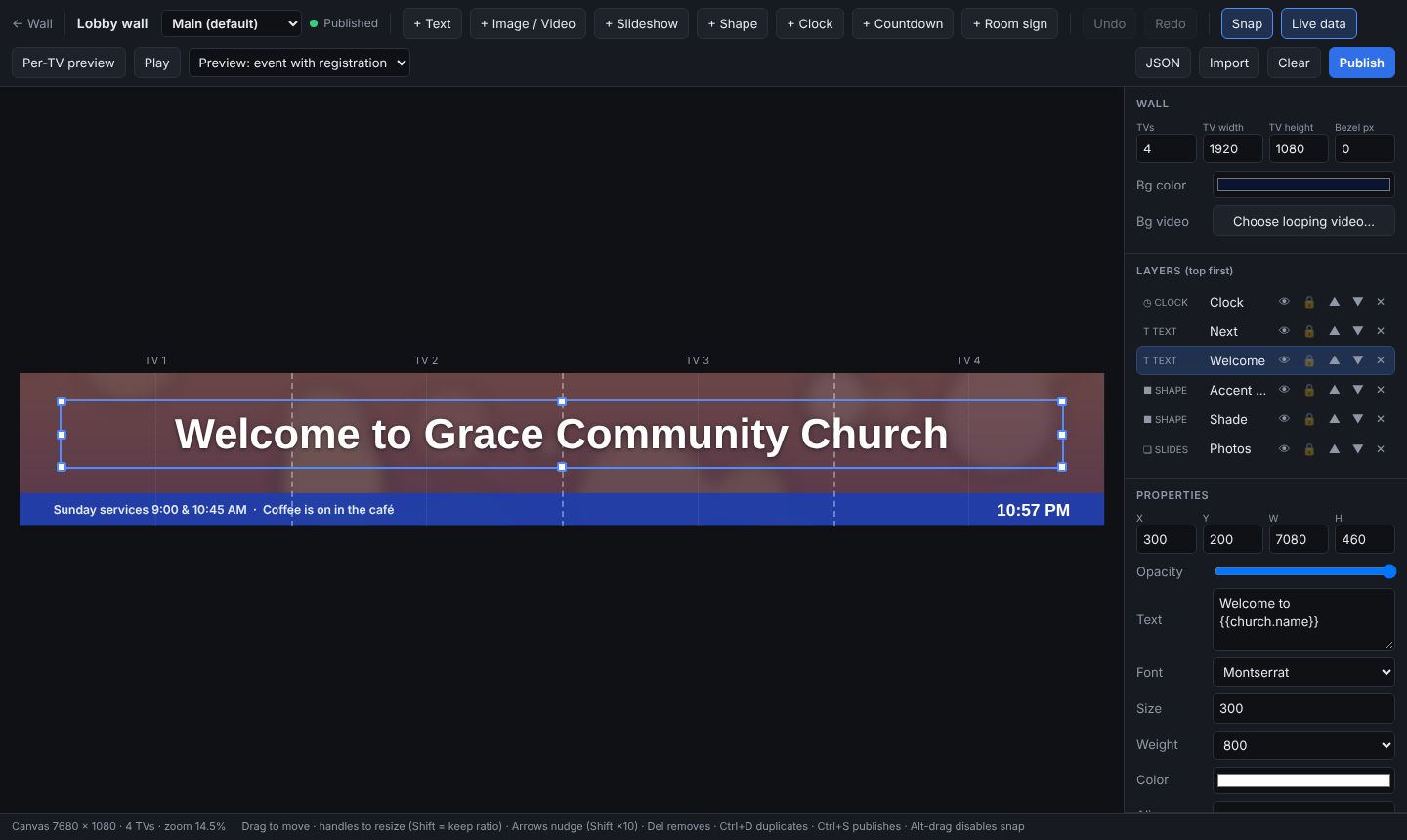
The LobbyLoop wall designer
The designer

Design the whole wall as one canvas.

Drag in text, photos, slideshows, video and clocks. Snap guides line everything up across the TVs, and the per-TV preview shows exactly what each screen will get.

  • Text variables like {{church.name}} fill in automatically
  • Entrance animations and slow-zoom slideshows
  • Undo, duplicate, keyboard nudging, all the basics
One dashboard

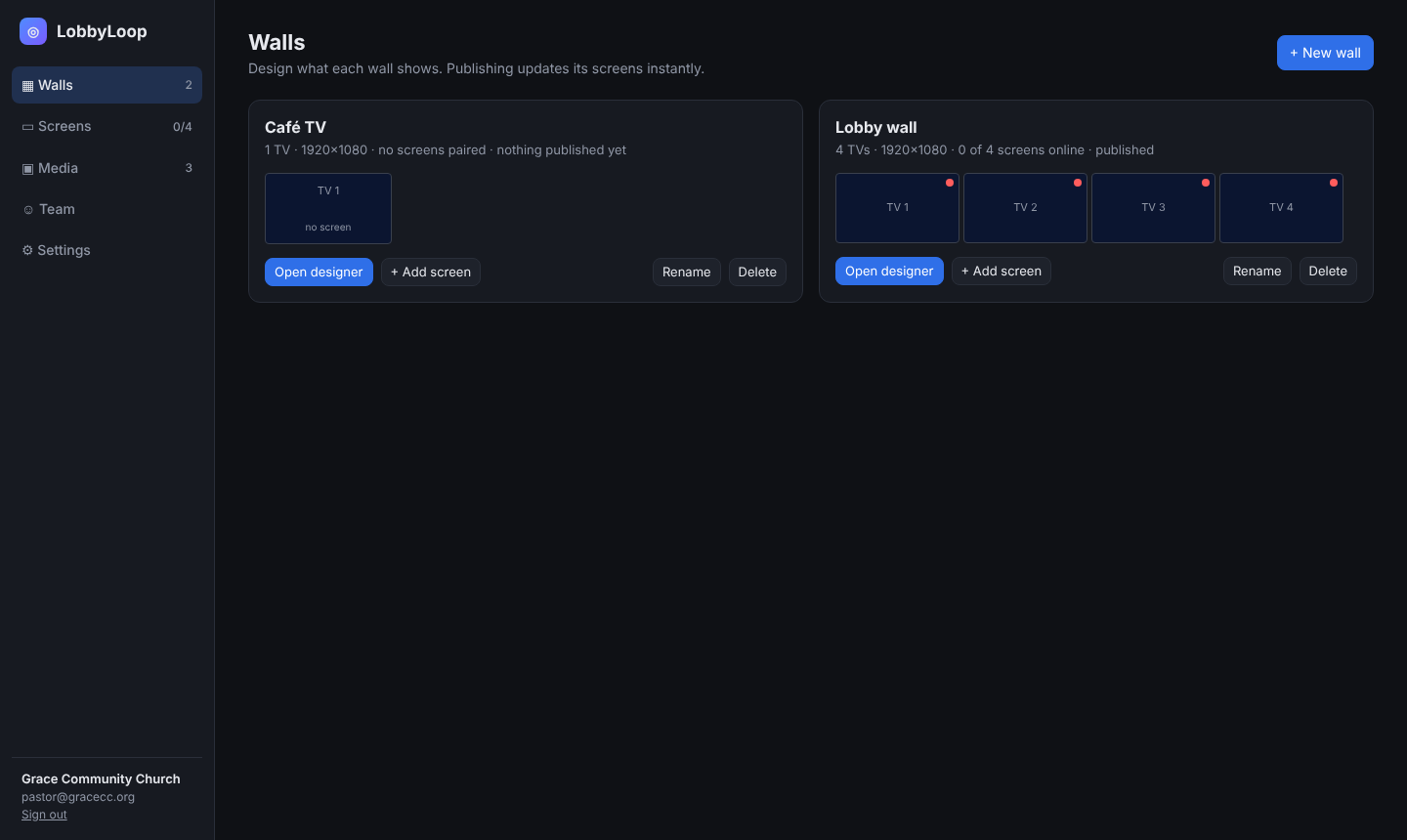
See every screen at a glance.

Know which TVs are online, what's published where, and fix things remotely. Reload or reassign a screen without leaving your office.

  • Online and offline status for every TV
  • Shared media library for photos and video
  • Drafts autosave until you're ready to publish
LobbyLoop dashboard showing walls and which TVs are online
Free during the beta

Try LobbyLoop at your church.

We're opening the beta to a small group of churches. It's free while we build it with you. In return, we'd love your honest feedback.

  • Free for the whole beta. No card needed.
  • Help setting up your first screens
  • A direct line to the person building it
Questions

Good to know

What does it cost?

Nothing during the beta. When it launches, beta churches will get a thank-you discount.

What hardware do I need?

Any TV with HDMI and a Raspberry Pi 4 or 5 (about $60 with a power supply and SD card), or any computer that runs Chrome.

Do I need Planning Center?

No. LobbyLoop works on its own. Planning Center room signs are an optional extra that's coming soon.

What if our internet goes down?

Each TV keeps showing its last published content and reconnects by itself when the internet comes back.